 FlectonePulse
/sprite
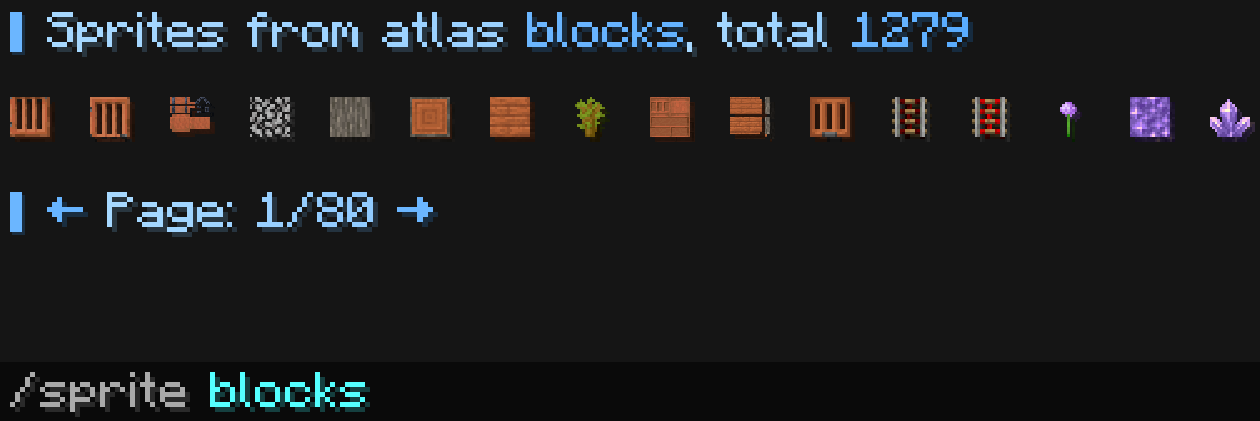
Command for searching sprites from Minecraft atlases
If a player types <sprite:...> in chat, it will always be white and cannot be colored. But if you write <sprite:...> in the configuration, it will always be colored, so use <white> before <sprite:...> to prevent the color from being applied.
Localization
Pathlocalizations → language.yml → command.sprite
sprite:
  null_atlas: "<color:#ff7171><sprite_or:⁉:gui:icon/chat_modified>This atlas does not exist"
  null_page: "<color:#ff7171><sprite_or:⁉:gui:icon/chat_modified>This page does not exist"
  download_error: "<color:#ff7171><sprite_or:⁉:gui:icon/chat_modified>Failed to download atlas, it may not exist, please try again later"
  atlas_downloading: "<fcolor:2>★ <fcolor:1>Atlas <fcolor:2><atlas> <fcolor:1>is downloading, wait..."
  header: "<fcolor:2>▋ <fcolor:1>Sprites from atlas <fcolor:2><atlas><fcolor:1>, total <fcolor:2><count> <br>"
  line_element: "<white><hover:show_text:\"<fcolor:1>Copy <fcolor:2><sprite>\"><click:copy_to_clipboard:'<sprite:<atlas>:<sprite>>'><sprite:<atlas>:<sprite>> "
  footer: "<br><fcolor:2>▋ <click:run_command:\"<command> <prev_page>\">←</click> <fcolor:1>Page: <current_page>/<last_page> <fcolor:2><click:run_command:\"<command> <next_page>\">→"
null_atlas
Message if the entered atlas does not exist
null_page
Message if the entered page does not exist
download_error
Message when an atlas file fails to download from the internet. Atlases may vary or not exist on different versions, so this error should be treated as normal
atlas_downloading
Message when the atlas file starts downloading from the internet
header
Top part of the list message
line_element
Format for each component; they will be added one after another
footer
Bottom part of the list message
Setting
Pathcommand.yml → sprite
sprite:
  enable: true
  per_page: 16
  aliases:
  - "sprite"
  categories:
  - "armor_trims"
  - "banner_patterns"
  - "beds"
  - "blocks"
  - "celestials"
  - "chest"
  - "decorated_pot"
  - "gui"
  - "items"
  - "map_decorations"
  - "paintings"
  - "particles"
  - "shield_patterns"
  - "shulker_boxes"
  - "signs"
  cooldown:
    enable: false
  sound:
    enable: false
enable
Enables or disables the functionality of the module
per_page
The number of components per page
aliases
A list of aliases for using the command
Aliases can be anything. For example newcommand, newcommand_ru, ban, me etc.
categories
List of categories, i.e., available atlases
- Each atlas is downloaded only once if it does not exist in the
FlectonePulse/minecraft/<version>/atlases/folder - Each atlas has the final format
minecraft_textures_atlas_<atlas>.png.txt- Each atlas is downloaded from Flectone's own web server via the link
https://flectone.net/files/minecraft/r/minecraft/<version>/atlases/minecraft_textures_atlas_<atlas>.png.txt- Atlases do not necessarily have to be downloaded from the web server; you can place them in the
FlectonePulse/minecraft/<version>/atlases/folder in advance yourself by obtaining them using theF3 + Scombination in Minecraft
- Atlases do not necessarily have to be downloaded from the web server; you can place them in the
- Each atlas is downloaded from Flectone's own web server via the link
cooldown
Usage delay
sound
Sound playback
Permissions
Pathpermission.yml → command.sprite
sprite:
  name: "flectonepulse.module.command.sprite"
  type: "TRUE"
  cooldown_bypass:
    name: "flectonepulse.module.command.spy.cooldown.bypass"
    type: "OP"
  sound:
    name: "flectonepulse.module.command.spy.sound"
    type: "TRUE"
name
Permission name
type
Permission type
| Type | Explanation |
|---|---|
TRUE | Available to any player |
FALSE | Available to no one, must be granted separately (e.g., using LuckPerms) |
OP | Available to server operators |
NOT_OP | Available to NON-operators of the server |
cooldown_bypass
Permission to ignore the cooldown between uses
sound
Permission to use the sound
