 FlectonePulse
/flectonepulse
Main command of the FlectonePulse plugin
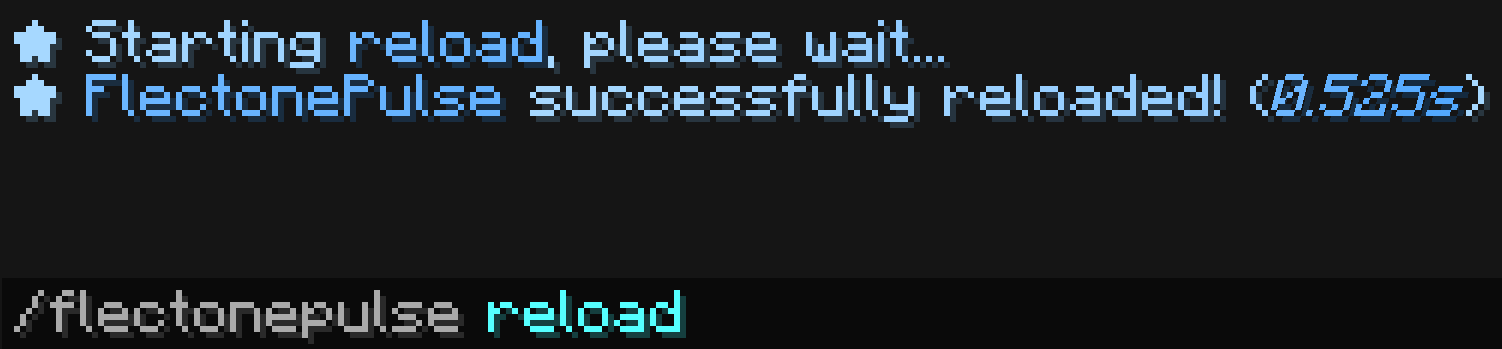
On older versions (1.9 and 1.10 specifically), it has been noticed that players might be kicked from the server during a reload, but this does not affect the plugin's operation.
The command is used as /flectonepulse type [file], where type is one of the actions below
| Type | Explanation |
|---|---|
reload | Reloads FlectonePulse together with all configs |
dump | Uploads information about the server and the plugin to pastes.dev and returns a link. It is convenient to send it to support if something does not work |

editor | Starts the web editor for configs and returns a link to it. host and port must be configured in command.yml |
export | Saves the FlectonePulse folder into a .zip archive next to the configs, without the libraries, backups, minecraft folders and .db database files |
export_all | The same as export, but with all files |
import | Unpacks a .zip archive back into the FlectonePulse folder and reloads the plugin. The archive must be in the FlectonePulse folder |
database_export | Saves the database into a .json file next to the configs |
database_import | Loads the database from a .json file and reloads the plugin. The file must be in the FlectonePulse folder |
The second argument can be the file name for export, export_all, import, database_export and database_import, for example /flectonepulse export myconfig. If it is not written, the name export_date_time or database_date_time for the database will be used
Localization
Pathlocalizations → language.yml → command.flectonepulse
flectonepulse:
  dump_error: "<color:#ff7171><sprite_or:⁉:gui:icon/chat_modified>An error occurred while uploading the dump: <error>"
  database_error: "<color:#ff7171><sprite_or:⁉:gui:icon/chat_modified>An error occurred while working with the database file <file>"
  null_host_editor: "<color:#ff7171><sprite_or:⁉:gui:icon/chat_modified>Host parameter must be configured in command.yml, field port"
  null_port_editor: "<color:#ff7171><sprite_or:⁉:gui:icon/chat_modified>Port <port> is unavailable, choose another one in command.yml, field port"
  null_file: "<color:#ff7171><sprite_or:⁉:gui:icon/chat_modified>File <file> does not exist"
  file_exist: "<color:#ff7171><sprite_or:⁉:gui:icon/chat_modified>File <file> already exists"
  format_starting: "<fcolor:1>★ Starting <fcolor:2><type><fcolor:1>, please wait..."
  format_false: "<color:#ff7171>★ Problem occurred during reload <br>Error: <error>"
  format_true: "<fcolor:1>★ <fcolor:2>FlectonePulse <fcolor:1>successfully reloaded! (<fcolor:2><i><time></i><fcolor:1>)"
  format_dump: "<fcolor:1>★ Dump link <fcolor:2><click:open_url:\"<url>\"><hover:show_text:\"<fcolor:2><url>\"><url>"
  format_editor: "<fcolor:1>★ Web editing link <fcolor:2><click:open_url:\"<url>\"><hover:show_text:\"<fcolor:2><url>\"><url>"
  format_export: "<fcolor:1>★ Files exported to <fcolor:2><file>"
  format_import: "<fcolor:1>★ Files imported from <fcolor:2><file>"
  format_database_export: "<fcolor:1>★ Database exported to <fcolor:2><file>"
  format_database_import: "<fcolor:1>★ Database imported from <fcolor:2><file>"
dump_error
Message when a dump upload error occurs
database_error
Message when an error occurs while exporting or importing the database
null_host_editor
Message when the host field in command.yml is empty
null_port_editor
Message when the port specified in command.yml is occupied or unavailable
null_file
Message when the file for import is not found in the FlectonePulse folder
file_exist
Message when the file for export already exists in the FlectonePulse folder
format_false
Message when an error occurs
format_true
The format of the message that will be sent upon reloading the entire FlectonePulse
format_dump
The format of the message that will be sent upon successful dump upload
format_starting
The format of the message that will be sent when an action starts, where <type> is replaced with its name
format_editor
The format of the message that will be sent upon a successful web server launch
format_export
The format of the message that will be sent upon a successful file export
format_import
The format of the message that will be sent upon a successful file import
format_database_export
The format of the message that will be sent upon a successful database export
format_database_import
The format of the message that will be sent upon a successful database import
Setting
Pathcommand.yml → flectonepulse
flectonepulse:
  enable: true
  execute_in_main_thread: false
  aliases:
  - "flectonepulse"
  - "fp"
  editor:
    host: ""
    https: false
    port: 25566
  destination:
    type: "CHAT"
  cooldown:
    enable: false
  sound:
    enable: false
enable
Enables or disables the functionality of the module
execute_in_main_thread
Whether the entire reload will be executed in the server's main thread
This may resolve reload issues on Bukkit, Spigot, Mohist, or other old/non-standard cores.
aliases
A list of aliases for using the command
Aliases can be anything. For example newcommand, newcommand_ru, ban, me etc.
editor
Web editing for FlectonePulse. The backend server runs where FlectonePulse is installed
destination
Where the message will be sent
| Type | Explanation | Requires additional configuration? |
|---|---|---|
ACTION_BAR | Message above the player's inventory | Yes |
BOSS_BAR | Message at the top of the screen | Yes |
BRAND | Message in F3 | No |
CHAT | Message in chat | No |
TEXT_SCREEN | Message anywhere on the screen | Yes |
TITLE | Full-screen message | Yes |
SUBTITLE | Full-screen message (bottom line) | Yes |
TAB_HEADER | Message in TAB (top) | No |
TAB_FOOTER | Message in TAB (bottom) | No |
TOAST | Message in the top right corner (achievement) | Yes |
cooldown
Usage delay
sound
Sound playback
Permissions
Pathpermission.yml → command.flectonepulse
flectonepulse:
  name: "flectonepulse.module.command.flectonepulse"
  type: "OP"
  cooldown_bypass:
    name: "flectonepulse.module.command.flectonepulse.cooldown.bypass"
    type: "OP"
  sound:
    name: "flectonepulse.module.command.flectonepulse.sound"
    type: "TRUE"
name
Permission name
type
Permission type
| Type | Explanation |
|---|---|
TRUE | Available to any player |
FALSE | Available to no one, must be granted separately (e.g., using LuckPerms) |
OP | Available to server operators |
NOT_OP | Available to NON-operators of the server |
cooldown_bypass
Permission to ignore the cooldown between uses
sound
Permission to use the sound
