 FlectonePulse
/ping
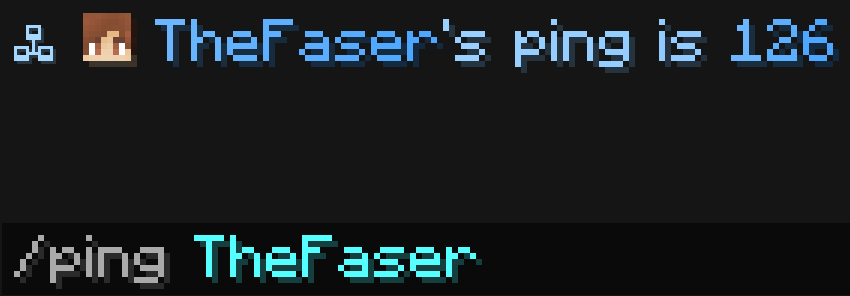
Command to find out information about a player's latency
Localization
Pathlocalizations → language.yml → command.ping
ping:
  null_player: "<color:#ff7171><sprite_or:⁉:gui:icon/chat_modified>This player does not exist"
  format: "<fcolor:1>🖧 <display_name>'s ping is <replacement:ping>"
null_player
Message if the entered player is not found
format
Format of the message that will be sent
Setting
Pathcommand.yml → ping
ping:
  enable: true
  aliases:
  - "ping"
  destination:
    type: "CHAT"
  cooldown:
    enable: false
  sound:
    enable: false
enable
Enables or disables the functionality of the module
aliases
A list of aliases for using the command
Information
Aliases can be anything. For example newcommand, newcommand_ru, ban, me etc.
destination
Where the message will be sent
| Type | Explanation | Requires additional configuration? |
|---|---|---|
ACTION_BAR | Message above the player's inventory | Yes |
BOSS_BAR | Message at the top of the screen | Yes |
BRAND | Message in F3 | No |
CHAT | Message in chat | No |
TEXT_SCREEN | Message anywhere on the screen | Yes |
TITLE | Full-screen message | Yes |
SUBTITLE | Full-screen message (bottom line) | Yes |
TAB_HEADER | Message in TAB (top) | No |
TAB_FOOTER | Message in TAB (bottom) | No |
TOAST | Message in the top right corner (achievement) | Yes |
cooldown
Usage delay
sound
Sound playback
Permissions
Pathpermission.yml → command.ping
ping:
  name: "flectonepulse.module.command.ping"
  type: "TRUE"
  cooldown_bypass:
    name: "flectonepulse.module.command.ping.cooldown.bypass"
    type: "OP"
  sound:
    name: "flectonepulse.module.command.ping.sound"
    type: "TRUE"
name
Permission name
type
Permission type
| Type | Explanation |
|---|---|
TRUE | Available to any player |
FALSE | Available to no one, must be granted separately (e.g., using LuckPerms) |
OP | Available to server operators |
NOT_OP | Available to NON-operators of the server |
cooldown_bypass
Permission to ignore the cooldown between uses
sound
Permission to use the sound
Last update July 21, 2026
Edit on Github