 FlectonePulse
Object
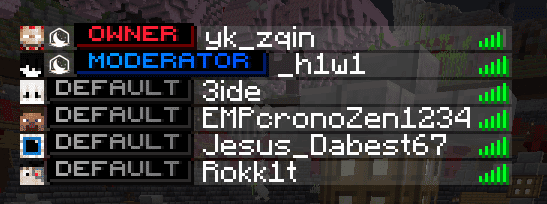
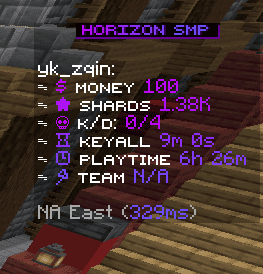
A module responsible for heads, sprites, and textures in chat without Resource Packs and without Mods
The module will only work for players playing on version 1.21.9 and above. It will not be displayed for others.
Displaying <player_head> and <texture> in MOTD is only available for players playing on 1.21.9 - 1.21.11 (in newer versions, Mojang removed this ability for MOTD)
Heads, sprites, and textures can be colored in config files. To prevent this, you need to use a white color before them. For example <white><player_head></white>


Localization
Pathlocalizations → language.yml → message.format.object
object:
  default_symbol: "☐"
default_symbol
The symbol for standard <player_head>, <sprite>, <texture> if the recipient cannot see the resulting object (for <player_head_or>, <sprite_or> and <texture_or> this is specified manually)
Setting
Pathmessage.yml → format.object
object:
  enable: true
  player_head_tag:
    enable: true
    need_extra_space: true
    hide_invisible_player_head: false
  sprite_tag:
    enable: true
    need_extra_space: true
  texture_tag:
    enable: true
    need_extra_space: false
    mineskin_api_key: ""
    values:
      example: ""
enable
Enables or disables the functionality of the module
player_head_tag
Enables formatting for the <player_head> placeholder. It can be used in different ways:
<player_head>returns the head of the player who sent the message<player_head:Notch>returns the head of the player whose name was specified inside<player_head:Notch:false>returns the player's head with the second layer disabled, for the name specified inside- If the specified name does not exist, the head will have a random default skin
<player_head_or:...>returns the player's head or the text specified as the first argument if the recipient cannot see heads in chat. For example<player_head_or:hello:Notch>returns Notch's head, and in the console, the wordhellowill appear
The playerlistname module already has <player_head> built in by default, and it only works for players who have an unofficial game version. For licensed versions, the tab will be standard.
need_extra_space
Enables adding an extra space for <player_head> tags written in config files. Spaces are not added to player messages.
hide_invisible_player_head
Enables hiding the player's head display if they have the invisibility effect.
sprite_tag
Enables formatting for the <sprite:...> placeholder. It can be used in different ways:
<sprite:name>, returns an icon from theblocksatlas, for example<sprite:block/oak_log>(this is the same as<sprite:blocks:block/oak_log>)<sprite:atlas:name>, returns an icon from the specified atlas, for example<sprite:gui:container/slot>- If the sprite is specified incorrectly, it will be an unknown texture. Using a resource pack, you can create your own sprites.
<sprite_or:...>returns an icon or the text specified as the first argument if the recipient cannot see icons in chat. For example<sprite_or:hello:block/oak_log>returns the oak icon, and in the console, the wordhellowill appear
The easiest way to find atlas and icon names is using the /sprite command
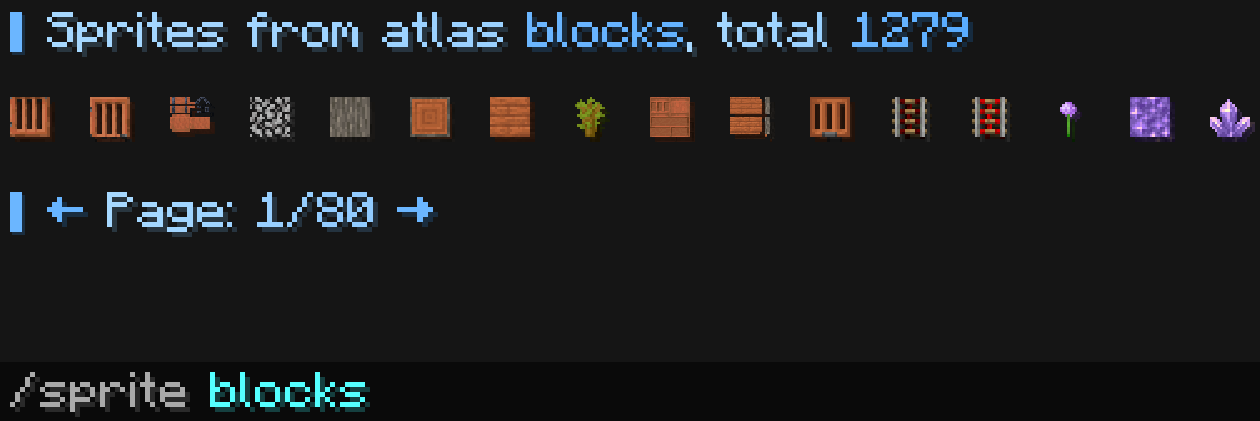
You can also find this in the folder created using the F3 + S combination inside Minecraft. There will be files named minecraft_textures_atlas_... with .txt and .png formats, which can help you find a suitable sprite.
For example, there is a gui atlas named minecraft_textures_atlas_gui.png.txt. In it, you can find a line with minecraft:container/slot x=494 y=54 w=18 h=18
Using these coordinates, you can visually find it in the .png atlas (to see what it looks like). To display it inside Minecraft, you need to remove the minecraft: prefix.
The result is <sprite:gui:container/slot>

need_extra_space
Enables adding an extra space for <sprite> tags written in config files. Spaces are not added to player messages.
texture_tag
Enables formatting for the <texture:...> placeholder to display your own image in Minecraft. It can be used in different ways:
<texture:name>, returns the texture image that was generated when FlectonePulse started<texture_or:...>returns the image or the text specified as the first argument if the recipient cannot see textures in chat. For example<texture_or:hello:flectonepulse>returns the image namedflectonepulse, and in the console, the wordhellowill appear
- All images for conversion must have dimensions that are multiples of
8(both height and width). A large image will take a long time to convert; this is due to the MineSkin limitation when using a free API key. For example, a 64x64 image will take 5 to 15 minutes to upload (maybe faster if the image has already been uploaded). - All images are converted only once, the first time they are added to
images. After that, aname.jsonfile is generated nearby, which will be used without the original image. You can later move these.jsonfiles to other servers without the image. If you need to regenerate the image, delete the.jsonfile.
How to create your own texture? For example, I have an image flectonepulse.png
Copy flectonepulse.png to the FlectonePulse/images/ folder
Go to message.yml and add a new name in values with the path to the image, for example
values:
  myimage: "flectonepulse.png"
Paste your own mineskin_api_key into message.yml
Reload FlectonePulse using /flectonepulse reload. The conversion may be long, very long, so you need to wait
After a successful reload, the file flectonepulse.json appears (next to flectonepulse.png) and it will be used in the future to load instantly. To use our texture, you need to write <texture:name> in any message, in our case it's <texture:myimage>
If you have a ready .json file, you don't need the image itself in FlectonePulse/images/ and you don't need to insert mineskin_api_key. FlectonePulse will load the image from the ready .json file itself.
need_extra_space
Enables adding an extra space for <texture> tags written in config files. Spaces are not added to player messages.
mineskin_api_key
The API key for MineSkin, which will be used to convert the image into a texture. It is free and can be generated here
To convert an image without a MineSkin API key, you can use our service FlectoneTools
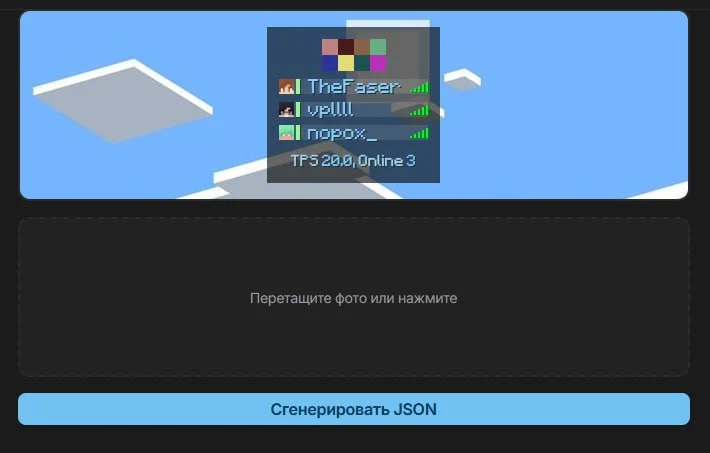 You only need to put the finished
 name.json file into the images folder, and write name.png in the config.
values
A list of textures with their locations
Permissions
Pathpermission.yml → message.format.object
object:
  name: "flectonepulse.module.message.format.object"
  type: "TRUE"
  player_head_tag:
    name: "flectonepulse.module.message.format.object.player_head"
    type: "TRUE"
  sprite_tag:
    name: "flectonepulse.module.message.format.object.sprite"
    type: "TRUE"
  texture_tag:
    name: "flectonepulse.module.message.format.object.texture"
    type: "OP"
name
Permission name
type
Permission type
| Type | Explanation |
|---|---|
TRUE | Available to any player |
FALSE | Available to no one, must be granted separately (e.g., using LuckPerms) |
OP | Available to server operators |
NOT_OP | Available to NON-operators of the server |
player_head_tag
Permission to use <player_head> in chat
sprite_tag
Permission to use <sprite> in chat
texture_tag
Permission to use <texture> in chat
