 FlectonePulse
Mention
By default, server administrators cannot be mentioned due to the bypass permission.
If the mentioned player is vanished and the sender cannot see them, the mention will stay in the message, but there will be no ping
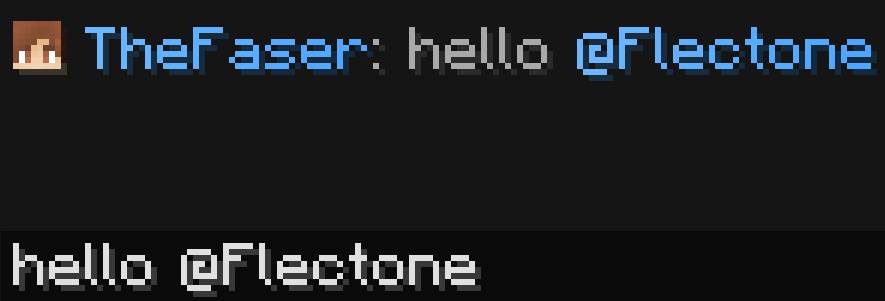
This formatting allows mentioning (pinging) a person in a message. You can also mention donation groups, for example, @default.
Localization
Pathlocalizations → language.yml → message.format.mention
mention:
  person: "<fcolor:2>You were mentioned!"
  format: "<fcolor:2>@<target>"
person
The message shown to a player when they are mentioned.
format
The message format if it is a player mention.
Setting
Pathmessage.yml → format.mention
mention:
  enable: true
  trigger: "@"
  name_pattern: "<trigger>([\\p{L}\\p{N}_.]*[\\p{L}\\p{N}_])"
  everyone_tag: "here"
  destination:
    type: "TOAST"
    icon: "minecraft:bell"
    subtext: ""
    style: "TASK"
  sound:
    enable: true
    volume: 0.1
    pitch: 0.1
    category: "BLOCK"
    name: "minecraft:entity.experience_orb.pickup"
enable
Enables or disables the functionality of the module
trigger
The symbol that must start the mention message.
For example, if I want to mention Flectone, I should write @Flectone.
name_pattern
A regular expression used to find a mention in a message. <trigger> inside it is replaced with the symbol from trigger
By default a mention consists of letters, digits, _ and ., but the last symbol cannot be a dot, so that @Flectone. at the end of a sentence still works
If you want only latin nicknames to be mentioned, write <trigger>([A-Za-z0-9_]+)
everyone_tag
The word that, in combination with the trigger, will mention all players on the server. To use this, the permission flectonepulse.module.message.format.mention.group.default is required.
destination
Where the message will be sent
| Type | Explanation | Requires additional configuration? |
|---|---|---|
ACTION_BAR | Message above the player's inventory | Yes |
BOSS_BAR | Message at the top of the screen | Yes |
BRAND | Message in F3 | No |
CHAT | Message in chat | No |
TEXT_SCREEN | Message anywhere on the screen | Yes |
TITLE | Full-screen message | Yes |
SUBTITLE | Full-screen message (bottom line) | Yes |
TAB_HEADER | Message in TAB (top) | No |
TAB_FOOTER | Message in TAB (bottom) | No |
TOAST | Message in the top right corner (achievement) | Yes |
sound
Sound playback
Permissions
Pathpermission.yml → message.format.mention
mention:
  name: "flectonepulse.module.message.format.mention"
  type: "TRUE"
  group:
    name: "flectonepulse.module.message.format.mention.group"
    type: "OP"
  bypass:
    name: "flectonepulse.module.message.format.mention.bypass"
    type: "FALSE"
  sound:
    name: "flectonepulse.module.message.format.mention.sound"
    type: "TRUE"
name
Permission name
type
Permission type
| Type | Explanation |
|---|---|
TRUE | Available to any player |
FALSE | Available to no one, must be granted separately (e.g., using LuckPerms) |
OP | Available to server operators |
NOT_OP | Available to NON-operators of the server |
group
The permission to mention a donation group, for example, @default.
Each group checks its own permission: flectonepulse.module.message.format.mention.group.group_name.
bypass
Permission to ignore mentions (not be pinged).
sound
Permission to use the sound
