 FlectonePulse
Colors
The fcolor tag is used for individual color settings for each player
Usage: <fcolor:number>
How does <fcolor:...> work?
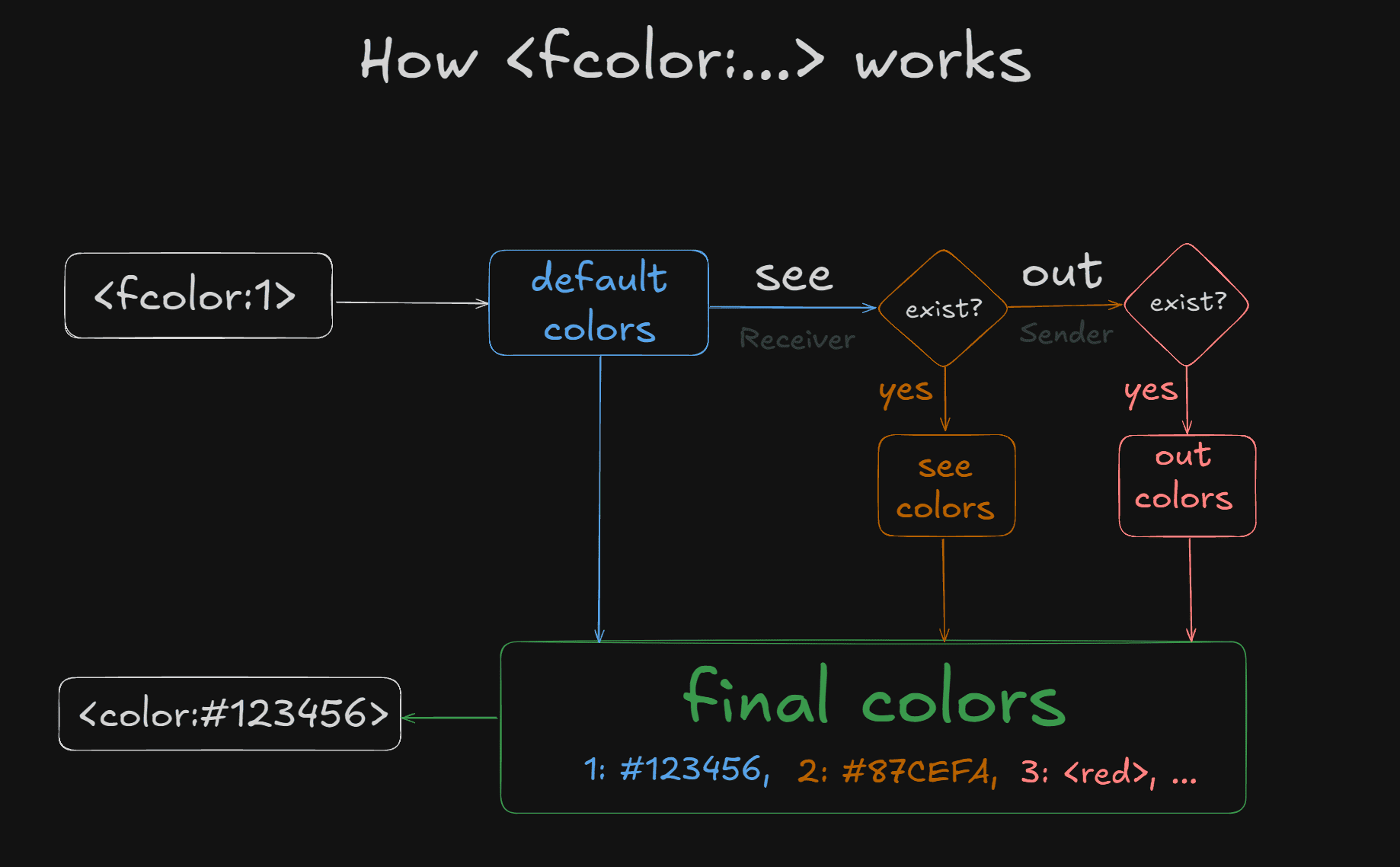
<fcolor:...> is a placeholder that is replaced by values from default_colors or, if the player has their own, by the player's custom colors.
The value of <fcolor:...> can be anything, but the command only allows writing colors of any format and <gradient:...:...>. There can be any number of these values; the maximum count is determined by the highest digit in default_colors.
Each digit represents a specific color. By default: <fcolor:1> is used for the primary color, <fcolor:2> is used for the primary color with emphasis (e.g., a name), <fcolor:3> for local chat messages, and <fcolor:4> for global chat messages.
<fcolor:...> has several states. By default, it is see – colors that the player will see for ALL messages ONLY for themselves, unless replaced by out – colors that ALL players will see for messages from THIS specific player (i.e., that player's personal colors).
Confused? There is an explanation in the image below, or here is an example: A player enters the command /chatcolor see red red red red. This means the player sees all messages as red on their end, but other players see messages according to their own settings. Now, suppose the player enters /chatcolor out green green green green. This means all of this player's messages will appear green to them and to all other players as well. It's important to understand that out overrides colors from see if they exist, meaning the player will also see other messages as green.
In simple terms: see is for personalizing YOUR OWN view, while out is for colors that OTHER players will also see.
Setting
Pathmessage.yml → format.fcolor
fcolor:
  enable: true
  default_colors:
    1: "<gradient:#A6D8FF:#8CC8FF>"
    2: "<gradient:#6BB6FF:#4DA6FF>"
    3: "#A9A9A9"
    4: "#FFFAFA"
enable
Enables or disables the functionality of the module
default_colors
List of all default colors used. Each digit represents a specific color. By default: <fcolor:1> is used for the primary color, <fcolor:2> is used for the primary color with highlighting (e.g., names), <fcolor:3> for local chat messages, and <fcolor:4> for global chat messages.
For example, if there is a color:
1: "<gradient:#A6D8FF:#8CC8FF>"1 is the number for the color <gradient:#A6D8FF:#8CC8FF>
To use this tag, you need to write <fcolor:1>
Permissions
Pathpermission.yml → message.format.fcolor
fcolor:
  name: "flectonepulse.module.message.format.fcolor"
  type: "TRUE"
  colors:
    SEE:
      name: "flectonepulse.module.message.format.fcolor.see"
      type: "TRUE"
    OUT:
      name: "flectonepulse.module.message.format.fcolor.out"
      type: "TRUE"
name
Permission name
type
Permission type
| Type | Explanation |
|---|---|
TRUE | Available to any player |
FALSE | Available to no one, must be granted separately (e.g., using LuckPerms) |
OP | Available to server operators |
NOT_OP | Available to NON-operators of the server |
colors
Available <fcolor:...> options and their corresponding permissions
