 FlectonePulse
Animation
The animation tag is used for smooth text transitions
It can be used in any messages that change over time (for example, in header/footer or sidebar) using: <animation:name>

How to make your own animation? For example a running dot in the TAB
In message.yml add the animation to format.animation.values
values:
  loading:
    raw: false
    interval: 1
In localizations → language.yml add the frames to message.format.animation.values. Every line is one frame, and after the last one the animation starts again
values:
  loading:
  - "<fcolor:2>● <fcolor:1>● ●"
  - "<fcolor:1>● <fcolor:2>● <fcolor:1>●"
  - "<fcolor:1>● ● <fcolor:2>●"
Insert <animation:loading> into a message that updates over time, for example into message.tab.header
Reload FlectonePulse with /flectonepulse reload
A frame changes only when the message itself updates, so the ticker period of that message should be small
Localization
Pathlocalizations → language.yml → message.format.animation
animation:
  values:
    flectonepulse:
    - "<#a6dbff>F<#9ad3fe>l<#8eccfd>e<#82c4fc>c<#77bdfc>t<#6bb5fb>o<#5faefa>n<#6bb5fb>e<#77bdfc>P<#82c4fc>u<#8eccfd>l<#9ad3fe>s<#a6dbff>e"
    - "<#a6dbff>F<#a6dbff>l<#9ad3fe>e<#8eccfd>c<#82c4fc>t<#77bdfc>o<#6bb5fb>n<#5faefa>e<#6bb5fb>P<#77bdfc>u<#82c4fc>l<#8eccfd>s<#9ad3fe>e"
    - "<#9ad3fe>F<#a6dbff>l<#a6dbff>e<#9ad3fe>c<#8eccfd>t<#82c4fc>o<#77bdfc>n<#6bb5fb>e<#5faefa>P<#6bb5fb>u<#77bdfc>l<#82c4fc>s<#8eccfd>e"
    - "<#8eccfd>F<#9ad3fe>l<#a6dbff>e<#a6dbff>c<#9ad3fe>t<#8eccfd>o<#82c4fc>n<#77bdfc>e<#6bb5fb>P<#5faefa>u<#6bb5fb>l<#77bdfc>s<#82c4fc>e"
    - "<#82c4fc>F<#8eccfd>l<#9ad3fe>e<#a6dbff>c<#a6dbff>t<#9ad3fe>o<#8eccfd>n<#82c4fc>e<#77bdfc>P<#6bb5fb>u<#5faefa>l<#6bb5fb>s<#77bdfc>e"
    - "<#77bdfc>F<#82c4fc>l<#8eccfd>e<#9ad3fe>c<#a6dbff>t<#a6dbff>o<#9ad3fe>n<#8eccfd>e<#82c4fc>P<#77bdfc>u<#6bb5fb>l<#5faefa>s<#6bb5fb>e"
    - "<#6bb5fb>F<#77bdfc>l<#82c4fc>e<#8eccfd>c<#9ad3fe>t<#a6dbff>o<#a6dbff>n<#9ad3fe>e<#8eccfd>P<#82c4fc>u<#77bdfc>l<#6bb5fb>s<#5faefa>e"
    - "<#5faefa>F<#6bb5fb>l<#77bdfc>e<#82c4fc>c<#8eccfd>t<#9ad3fe>o<#a6dbff>n<#a6dbff>e<#9ad3fe>P<#8eccfd>u<#82c4fc>l<#77bdfc>s<#6bb5fb>e"
    - "<#6bb5fb>F<#5faefa>l<#6bb5fb>e<#77bdfc>c<#82c4fc>t<#8eccfd>o<#9ad3fe>n<#a6dbff>e<#a6dbff>P<#9ad3fe>u<#8eccfd>l<#82c4fc>s<#77bdfc>e"
    - "<#77bdfc>F<#6bb5fb>l<#5faefa>e<#6bb5fb>c<#77bdfc>t<#82c4fc>o<#8eccfd>n<#9ad3fe>e<#a6dbff>P<#a6dbff>u<#9ad3fe>l<#8eccfd>s<#82c4fc>e"
    - "<#82c4fc>F<#77bdfc>l<#6bb5fb>e<#5faefa>c<#6bb5fb>t<#77bdfc>o<#82c4fc>n<#8eccfd>e<#9ad3fe>P<#a6dbff>u<#a6dbff>l<#9ad3fe>s<#8eccfd>e"
    - "<#8eccfd>F<#82c4fc>l<#77bdfc>e<#6bb5fb>c<#5faefa>t<#6bb5fb>o<#77bdfc>n<#82c4fc>e<#8eccfd>P<#9ad3fe>u<#a6dbff>l<#a6dbff>s<#9ad3fe>e"
    - "<#9ad3fe>F<#8eccfd>l<#82c4fc>e<#77bdfc>c<#6bb5fb>t<#5faefa>o<#6bb5fb>n<#77bdfc>e<#82c4fc>P<#8eccfd>u<#9ad3fe>l<#a6dbff>s<#a6dbff>e"
values
A list of all animations with text, where the key is the animation name and the value is a sequential list. The animation is always cyclical, and once it reaches the end, it starts over from the beginning
You can generate an animation using our service Text Animation
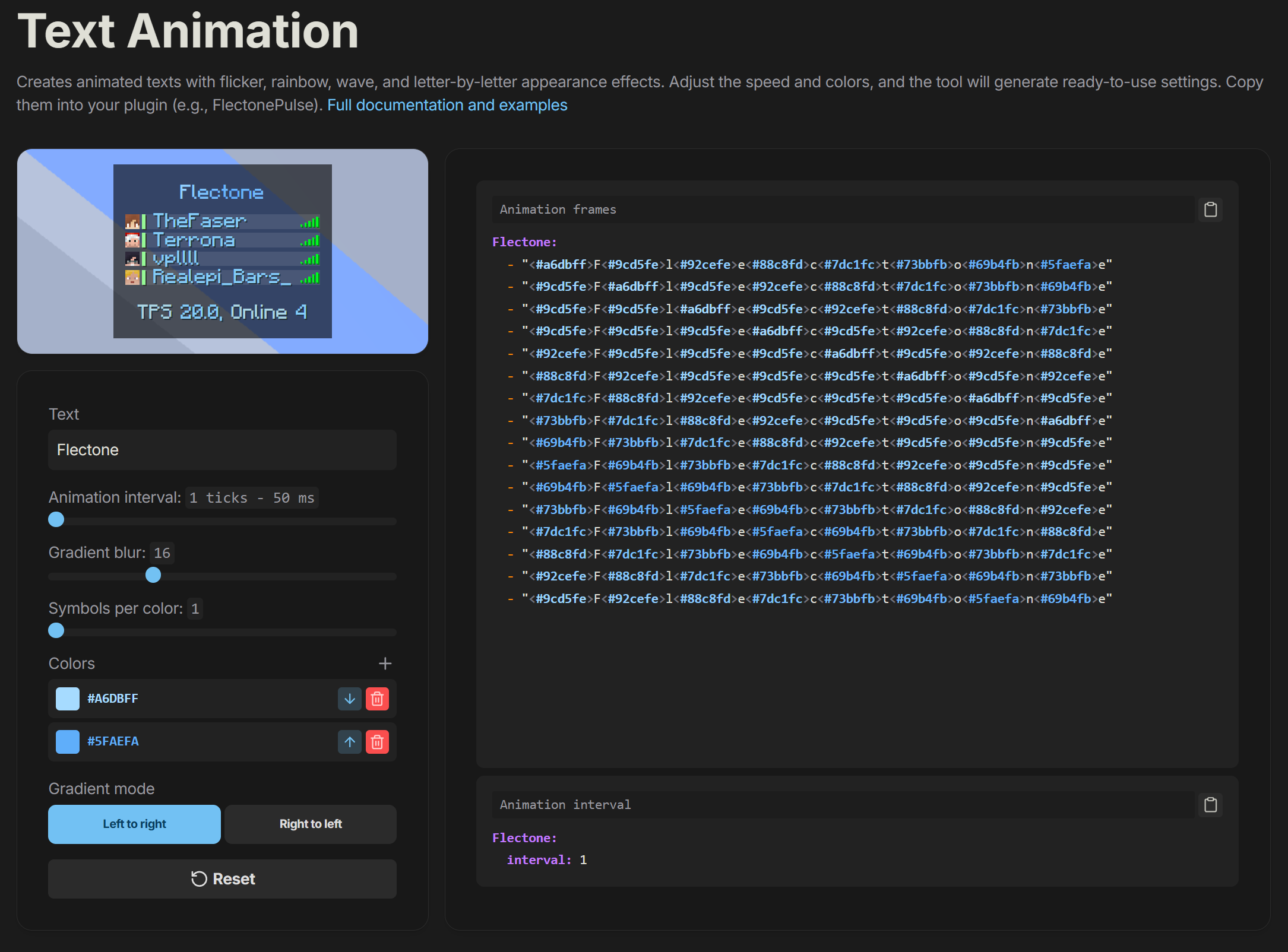
Setting
Pathmessage.yml → format.animation
animation:
  enable: true
  values:
    flectonepulse:
      interval: 5
enable
Enables or disables the functionality of the module
values
A list of all animations with settings, where the key is the animation name
interval
How often the text will change in ticks (20 ticks = 1 second)
You need to understand that this value depends on how often the text is shown to the player in the first place. Let's take header as an example, where the ticker period is 20 ticks, meaning the text changes every second, and our animation interval = 5, then the text will change every 5 seconds (period * interval)
For smooth animation, it is recommended to set the ticker period to 1, then the text change depends entirely on the interval
Permissions
Pathpermission.yml → message.format.animation
animation:
  name: "flectonepulse.module.message.format.animation"
  type: "TRUE"
  values:
    flectonepulse:
      name: "flectonepulse.module.message.format.animation.flectonepulse"
      type: "TRUE"
name
Permission name
type
Permission type
| Type | Explanation |
|---|---|
TRUE | Available to any player |
FALSE | Available to no one, must be granted separately (e.g., using LuckPerms) |
OP | Available to server operators |
NOT_OP | Available to NON-operators of the server |
values
A list of all animations with their individual permissions
