 FlectonePulse
Players
Module responsible for the number of players on the server
If you want MOTD/players/icon to work on the Proxy, you need to go to the Proxy settings (e.g. in velocity.toml), find ping-passthrough and enable this setting (e.g. set to all)


Localization
Pathlocalizations → language.yml → message.status.players
players:
  samples:
  - name: "<players>"
  full: "<color:#ff7171>The server is full"
samples
List of server players. The <players> placeholder adds all server players to the list.
You can add any messages
samples:
- name: "<red>Hello world"
  id: null
- name: "<players>"
  id: null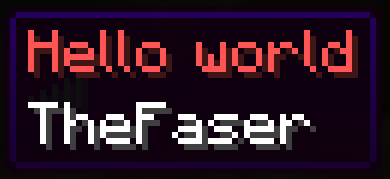
or create fake players
samples:
- name: "Notch"
  id: null
- name: "<players>"
  id: null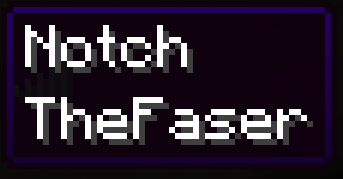
Only available colors can be used
| Color |
|---|
AQUA |
BLACK |
BLUE |
DARK_AQUA |
DARK_BLUE |
DARK_GRAY |
DARK_GREEN |
DARK_PURPLE |
DARK_RED |
GOLD |
GRAY |
GREEN |
RED |
LIGHT_PURPLE |
WHITE |
YELLOW |
full
Message when connecting to a full server
Setting
Pathmessage.yml → status.players
players:
  enable: false
  control: true
  max: 69
  online: ""
enable
Enables or disables the functionality of the module
control
If enabled, the player will not be allowed to join the server if there are more players than specified
max
Maximum number of players on the server
online
A number that allows you to specify any online count on the server
The number can be anything, even a placeholder, for example "%server_online%", but if empty, the current server online will be used
Permissions
Pathpermission.yml → message.status.players
players:
  name: "flectonepulse.module.message.status.players"
  type: "TRUE"
  bypass:
    name: "flectonepulse.module.message.status.players.bypass"
    type: "OP"
name
Permission name
type
Permission type
| Type | Explanation |
|---|---|
TRUE | Available to any player |
FALSE | Available to no one, must be granted separately (e.g., using LuckPerms) |
OP | Available to server operators |
NOT_OP | Available to NON-operators of the server |
bypass
Permission to connect to a full server
